
Funding a bwin account is usually straightforward, but the right steps depend on the payment methods currently available to your account and the terms shown at checkout. This guide explains how UK players can make a deposit, what to check before confirming it, and how to handle common payment issues. Banking options, limits and processing times can change, so treat the cashier displayed in your account as the definitive source.
Before depositing, make sure you are using the official bwin website or app and that online gambling is legal where you are. bwin is associated with regulated gambling services, but availability and product terms can vary by location. Check the operator’s current UK licensing information, read the relevant terms, and only use an account registered in your own name.
Before You Deposit
Have your account details and a payment method ready. The name on the payment account should generally match the name on your bwin account; third-party payments may be rejected or returned. You may also need to complete identity and age checks before making a payment or withdrawing funds. UK gambling services are for adults aged 18 and over.
- Confirm your account: Use accurate personal details and complete any requested verification.
- Check the currency: Review the amount and currency shown in the cashier before confirming;
- Review limits: Check the minimum and maximum deposit for the chosen method.
- Set a budget: Decide what you can afford to spend before opening the cashier.
- Read the offer terms: Bonuses may have eligibility rules, wagering requirements, and payment-method restrictions.
How to Make a bwin Deposit
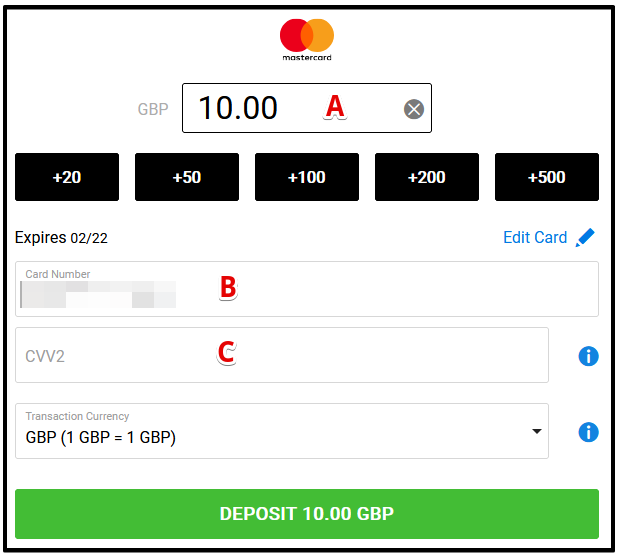
- Sign in securely. Open the official bwin site or app and log in. Avoid shared devices and public Wi-Fi when entering financial details.
- Open the cashier. Look for the deposit, payments, or cashier section in your account menu.
- Choose a payment option. The cashier will show methods available to your account. These may include cards, bank-related options, or approved e-wallets, but availability can change.
- Enter the amount. Check the displayed limits and type the amount you intend to deposit. Do not add extra funds just to qualify for a promotion unless the terms and your budget make sense.
- Provide payment details. Follow the provider’s secure instructions. Confirm that the amount, account, and any applicable fee are correct.
- Confirm and wait for the result. Keep the cashier open until you see a confirmation, or check your transaction history. Do not repeatedly submit the same payment while a transaction is pending.
Choosing a Payment Method
There is no single best method for every player. A card may be convenient, while a bank-based option or e-wallet may suit someone who prefers to keep gambling transactions separate from everyday purchases. The available choices, transaction speed, limits, and withdrawal compatibility should all be checked in the cashier and the payment provider’s own terms.
Cards and bank payments
If a card or bank option is listed, follow the on-screen instructions and any authentication request from your bank. A bank may decline a gambling-related payment because of its own policies or account controls. A decline does not necessarily mean bwin has received the funds. Check your banking app and bwin transaction history before trying again, and contact the relevant provider if the status is unclear.
E-wallets and other listed options
When an e-wallet or another digital payment method appears in the cashier, check whether it can also be used for withdrawals. Some providers apply their own verification steps or processing times. Make sure the wallet is yours and that its registered information matches your bwin account details where required.
Never send money to an account or person outside the official payment flow. bwin support should not ask you to disclose your full password, card security code, or one-time authentication code.
Deposit Checks and Common Problems
Most deposit problems can be narrowed down by checking the status of the transaction first. If a payment is pending, allow time for the bank or payment provider to process it. If it is declined, verify the details and available balance, then check whether the provider permits gambling transactions. Avoid making repeated attempts, which can create multiple pending authorisations.
| What you see | What to check | Next step |
|---|---|---|
| Payment declined | Entered details, available balance, bank restrictions | Contact your bank or choose another method shown in the cashier |
| Payment pending | Transaction history and provider status | Wait for an update; do not submit the same payment again immediately |
| Money left your account, but bwin balance did not update | Receipt, time, amount, and transaction reference | Contact bwin support through the official site or app |
| Deposit option unavailable | Account eligibility, location, and current cashier list | Check the help pages or ask support which options currently apply |
When contacting support, provide the transaction date, amount, payment method, and reference number if available. Do not send full card details or passwords. If you share a screenshot, hide unrelated personal or financial information.
Questions and Answers
How long does a bwin deposit take?
Timing depends on the method and the provider. Some payments may appear quickly, while others can take longer to authorise or process. The cashier and payment provider are the best places to check the current estimate.
Is there a minimum deposit?
Minimum and maximum amounts can differ by method and account. The cashier should display the applicable limits before you confirm a transaction.
Can I deposit using someone else’s card or wallet?
You should use a payment method in your own name. Third-party payments may be refused, delayed, or subject to additional checks under the operator’s terms.
Why is my deposit missing?
First check whether the payment is pending, declined, or completed in both your bwin transaction history and the provider’s account. If funds appear to have been taken but are not credited, contact official support with the transaction reference. A temporary authorisation may also disappear if a payment does not complete.
Can I reverse a deposit?
A completed deposit may not be reversible through the cashier. If you made an error or do not recognise a transaction, contact bwin and your bank or payment provider promptly. Do not dispute a legitimate transaction without first checking its status and the applicable process.
Will a deposit qualify me for a bonus?
Not necessarily. Promotions can depend on the chosen payment method, opt-in requirements, account eligibility, and deadlines. Read the full terms before depositing, including wagering requirements and any withdrawal restrictions.
Security and Responsible Gambling
Use a unique password and enable any additional account security options available. Keep your device and browser updated, sign out on shared devices, and access bwin by typing the official address or using the verified app listing. Be cautious of messages that imitate customer support or promise guaranteed winnings in return for a payment.
Depositing should be a deliberate choice, not a response to pressure or losses. Set a spending limit before you play and stop when you reach it. Do not borrow money, use funds needed for essentials, or treat gambling as a way to earn income. UK players can use responsible-gambling tools such as deposit limits, time-outs, and self-exclusion where available. If gambling is causing harm, contact a recognised UK support service such as GamCare or the National Gambling Helpline for confidential help.
For a smooth deposit, use your own verified payment method, check the cashier’s current instructions, and save the confirmation details. If anything does not match what you expect, pause and ask official support before trying again. bwinapp-uk Secure Access
